
How I Used AI Coding Assistants Without Sharing My Photos
 By Aayush Goenka5 min read

Summary
- An AI coding assistant sends what it reads to the company that runs it, a problem for software that handles private files.
- My assistant wrote the code for my photo system without receiving my personal photos.
- A folder block in the assistant’s settings is the start, not the whole fix: programs that touch the data need reading before they run.
If you use an AI coding assistant on anything personal, there’s a catch. Claude, the AI assistant made by Anthropic, runs on Anthropic’s computers, not mine, so anything it reads while it works gets sent to the company. That’s fine for a to-do app. It’s a problem when the software exists to handle your family photos, your bank statements, or a client’s records.
Claude wrote all the code for my local AI photo library, a system that sorts and describes ten years of my photos and videos, about 12.5k files. It never read one of my personal photos, the database that describes them, or the logs (the running notes the system keeps as it works). AI models running on my own Mac handle the photos themselves.
Short answer: treat the code and the data as two different things. The assistant gets the code, my questions, and counts or test scores I’ve checked first; I keep the personal files out of what I share. It’s a practice, not a guarantee. Here’s how I kept them apart, and where that leaks.
Separate the code from the data
Most software doesn’t need the person writing it to look at the data, only to know its shape: what kinds of information exist, how many records there are, what errors show up. Claude could read and write the code, the instructions, and the settings. I blocked its file tools from the folder where my photos and other private files live.
How to block Claude Code from a folder
Claude Code, the version of Claude that works directly on your computer’s files, lets you block it from a folder:
- Open your user settings. The file is
~/.claude/settings.json, so the rule covers every project. Merge the rules below into what’s already there, or type/permissionsinside Claude Code and add them as Deny rules. - Add two deny rules. One for reading and one for editing.
~/Privateis an example; use your folder’s path, starting with~/(your home folder) or//(the root of the disk). A single/points somewhere else. - Test it with a dummy file. Put a harmless file in the folder and ask Claude to open it. It should refuse.
{
  "permissions": {
    "deny": [
      "Read(~/Private/**)",
      "Edit(~/Private/**)"
    ]
  }
}A block on the assistant is not a wall around your files. A program the assistant writes can read anything your computer lets it read.
The block covers Claude’s own file tools1 and the file commands it recognizes, not a program that opens files by itself. So I read every program that touched the data, then ran it myself. Claude Code’s sandbox2 can add operating-system limits to the shell commands Claude runs and the programs they start, but not to every tool or to a program you run yourself.
When it needs to know something, ask for counts
Fixing a bug, a mistake in the code, normally means looking at the data. Here it meant a loop: Claude writes a small program, I read it and run it on my Mac, I check what it prints, and only those approved counts go back to Claude.
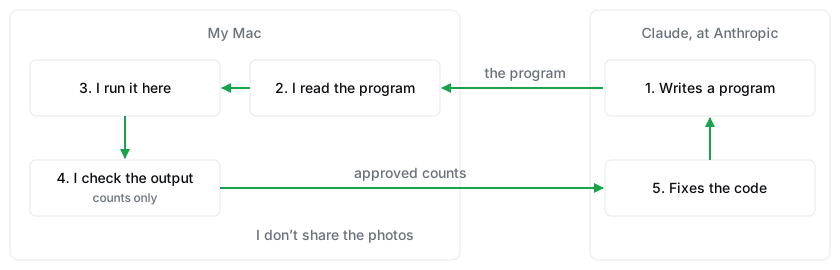
In a test run of about 1,300 files, 3 failed. The counts showed all 3 were photos full of text, where the model’s answer ran past its length limit. The problem was recreated on a test page drawn by the computer and fixed the same evening.
What a debugging program may print
Choose models on public test sets
The harder problem was choosing which local AI models to trust with the photos. They had to be free, run locally, and actually run on my Mac. You’d normally judge a model by trying it on your own pictures. Instead, every comparison Claude ran used public research collections, sets of photos published for exactly this kind of testing: COCO3 for everyday scenes, LFW for faces, and Oxford-IIIT Pets for cats and dogs.
On ten of those public photos, one model counted all 13 children in a scene; another made up things that weren’t there.
Public photos weren’t enough for reading faces to choose the best shot from a burst. So I marked 30 cropped faces from my own photos by eye; Claude wrote the test, I ran it, and Claude saw only the scores.
The scores exposed a problem the 8 ordinary public test faces never showed: when sunglasses hid the eyes, a yes-or-no question about open eyes had no right answer.
Stop private-data jobs from using a cloud model
Blocking the assistant protects against the assistant. It doesn’t protect against me, a few weeks from now, plugging a cloud model (one that runs on a company’s computers) into a new project out of habit. So in October I put the rule into the program itself.
The program that runs my jobs refuses to start any job that is set up to read private files and send them to a cloud model. If you build a system that runs jobs, it’s an extra safeguard worth adding.
What this does not protect
What still leaves my Mac
It also costs time: finding bugs through counts is slower than looking at the file. I accepted that, because the whole point was that AI on my own Mac handles the photos.
A first experiment to try
This works for a family archive or any folder of personal files. For data at work, your employer’s rules on what may go to an AI company come first.
- Block a test folder. Put a few dummy files in it and add the deny rules above.
- Ask which file type is most common. Have Claude write a program that counts the dummy files by type. Read it, run it yourself, check the output, and paste back only the totals.
- Check the answer. Compare Claude’s answer with the dummy files you put in the folder. It should identify the most common file type without reading those files.
I built and debugged the whole system without sending a personal photo to the coding assistant.
Sources
- 1Claude Code Docs. Configure permissions
- 2Claude Code Docs. Sandboxing
- 3COCO. Common Objects in Context
All sources checked October 20, 2026.