
How I Find Near-Duplicate Photos with Local AI
 By Aayush Goenka6 min read
Summary
- Taking several shots of the same moment is easy; finding time to sort through them is harder.
- My local setup groups similar photos and uses sharpness and AI to suggest a keeper, without uploading my pictures.
- I review the suggestions before anything goes to the Trash, because the highest-rated shot isn’t always the one I want.
I always take many, many shots of the same moment. Taking pictures on a phone is so easy that I end up with several almost identical photos. If you do this too, you know what comes next: some are great shots, some are easy to discard, and the rest need a closer look. But who has time to go back and sort through them all?
I also don’t want to send my personal pictures and videos to an AI company, so I figured I’d try cleaning them up with my local AI setup. Along the way, I learned a lot about what makes a good photo, and most of it turned out to be math, not AI. Here’s what I did.
Two kinds of duplicate photos
I started with about 12.5k photos and videos copied from Apple Photos onto my Mac, as part of my local photo library. This is my own code, not an app you can download. If you try something similar, work on a copy of your library first.
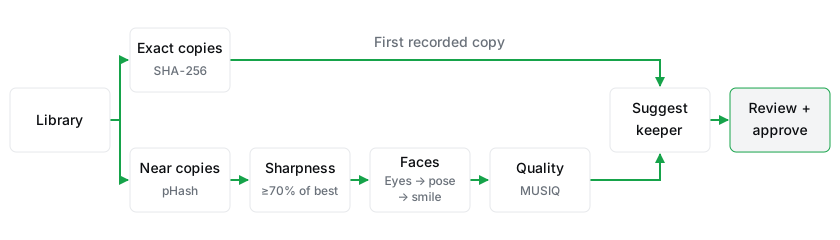
Copies come in two kinds, and each needs its own check:
What counts as a copy
Exact copies: match the file
I use SHA-2561 to calculate a hash, a 64-character code made from a file’s data. Identical files produce the same code, whatever their names or folders.
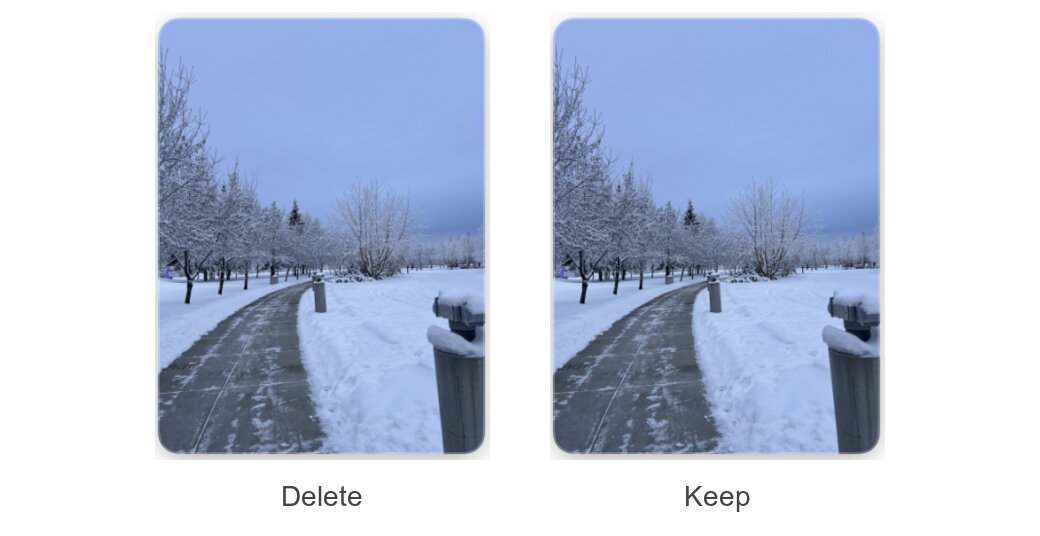
Resaving a photo through a chat app, or exporting an edit, changes the file’s data and its code. Those copies need a different check.
Near copies: compare how the pictures look
A perceptual hash fingerprints how a picture looks, not the data in the file. My code follows the pHash method used by the ImageHash library.2 It shrinks the photo to a tiny grey square, keeps only its broadest patterns of light and dark, and writes them down as 64 bits, a row of ones and zeros.
Resizing, mild blur, or a small crop barely changes those bits. To compare two photos, the system counts how many of the 64 bits differ. There’s no AI here, just math.
Here are two shots from one burst of our cat, Chandi:
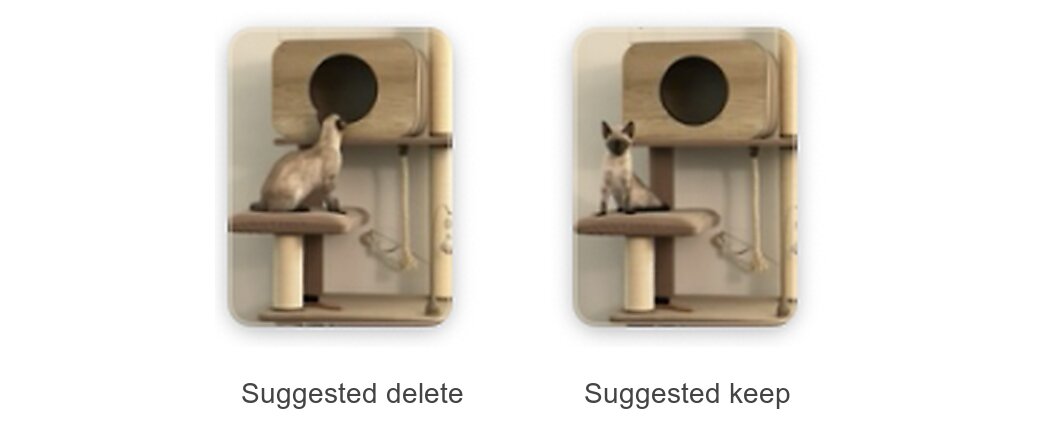
A higher cutoff catches more of a burst but can merge different moments at the same beach. A lower one can split a burst. I tried several cutoffs on my own photos and checked the groups each made before choosing 8. Those groups held bursts, resaves, and forwarded copies, some with changed dates, so there’s no time limit. I haven’t labeled the whole library to measure how often the grouping is wrong.
If shot one matches shot two, and shot two matches shot three, all three join one group, even when the first and last differ by more than 8 bits. Long chains can join distinct moments, so they need a closer look.
Pick a keeper
Exact copies are identical, so the system keeps the first file it recorded. Near copies need a real choice.
My first rule picked the photo with the highest AI quality rating. It chose a hazy shot over a clear one of the same moment, because a quality model can prefer a smooth blur to a sharp photo that’s dark and grainy. So now the system checks three things, in order:
- Sharpness. Drop any photo less than 70% as sharp as the sharpest one in its group.
- Faces. Prefer the most open eyes, then the most faces toward the camera, then the most smiles.
- Quality. If it’s still a tie, take the best quality rating.
None of these steps delete anything. They only suggest a keeper.
Sharpness: math, not AI
The system makes a grayscale working copy, 1,024 pixels on its longest side so every score is comparable, and measures how sharply brightness changes from pixel to pixel. The calculation is called variance of the Laplacian: crisp edges score high, blur scores low. Adding this filter changed just under 3% of my keeper suggestions, including the hazy one.
Faces: an AI model reads them
My constraint: everything had to run locally on my Mac, so I could only pick from models that were free, ran locally, and actually ran on my machine. To read faces, I run Google’s Gemma 43 (the 26B-A4B version), an AI model that can look at a photo and answer questions about it. I use a compressed copy built for Macs4 by the MLX community. It is the model that came out ahead in my Gemma 4 vs Qwen test. I compared it with Qwen3.8-27B5 on 30 faces I had labeled by hand:
| Model | Facing correct | Eyes correct | Smiling correct | Seconds per face |
|---|---|---|---|---|
| Gemma 4 | 93% | 90% | 83% | 0.70 |
| Qwen3.8 | 93% | 93% | 90% | 1.52 |
Rounded results from 30 faces on my M5 Max Mac with 128 GB memory. Eyes were open, closed, or hidden. A sample this small doesn’t establish general accuracy.
Qwen was slightly more accurate but more than twice as slow, so I chose Gemma. In a later run, roughly 2,000 faces took about 28 minutes.
About a third of the test faces wore sunglasses, which is why the model answers open, closed, or hidden instead of yes or no. Then I ran it on roughly 300 faces and checked every one it called closed:
The system now counts only open eyes; closed and hidden count the same. If everyone wears sunglasses, facing the camera and smiling decide.
Quality: settle the remaining ties
For photos still tied, I use MUSIQ,6 a model trained on people’s ratings of photos. My version is the KonIQ-10k one from Google’s MUSIQ model page,7 scoring the same 1,024-pixel copy. If even that ties, the sharper photo wins, then the first file recorded. I explain how I chose MUSIQ in Can AI rate photo quality?
Review before anything moves
The system lays out each group side by side in one folder, with keep or delete added to each file name. I scan through the groups quickly, change delete to keep wherever I disagree, and answer yes when it asks “reviewed?” The extras go to the Trash, where I can still restore them, and everything else goes back where it was.
Groups with a photo recognized as Chandi skip the review, because her bursts become Instagram stories. Decide your own exceptions before you run anything.
The math narrows the choice. Which moment you keep is still yours.
Sources
- 1NIST. Secure Hash Standard (FIPS 180-4)
- 2Johannes Buchner. ImageHash: A Python Perceptual Image Hashing Module
- 3Google. Gemma 4 model card
- 4MLX Community. gemma-4-26b-a4b-it-8bit
- 5Qwen. Qwen3.8-27B model card
- 6Google Research. MUSIQ: Multi-scale Image Quality Transformer
- 7Google. MUSIQ models on Kaggle
All sources checked October 20, 2026.