
How I Organized My Photo Library with Local AI
 By Aayush Goenka6 min read
Summary
- Years of photos and videos pile up, and finding or cleaning up any of them means endless scrolling.
- I turned mine into a searchable database with AI that runs on my own Mac, without sending them to an AI company.
- The AI still makes mistakes, so I tested each tool on pictures I could check, and naming faces and deleting stay with me.
I had ten years of photos and videos on my phone, about 12.5k files, and I had never deleted or organized any of it. If you’re like me, yours keep piling up too: screenshots you no longer need, ten shots of the same moment because one of them had to be the good one, and no way to find the picture you want without scrolling for ten minutes.
Claude or ChatGPT would normally be my first stop for a job like this. But they run on their companies’ computers, so using them means sending your files there, and I didn’t want to hand over my family photos. So I tried local AI: AI that runs on your own computer, so your files stay there, as long as the machine is powerful enough.
It worked. I now have a database, a big searchable table, that describes and rates almost every photo and video I own. A job runs every night to keep it up to date.
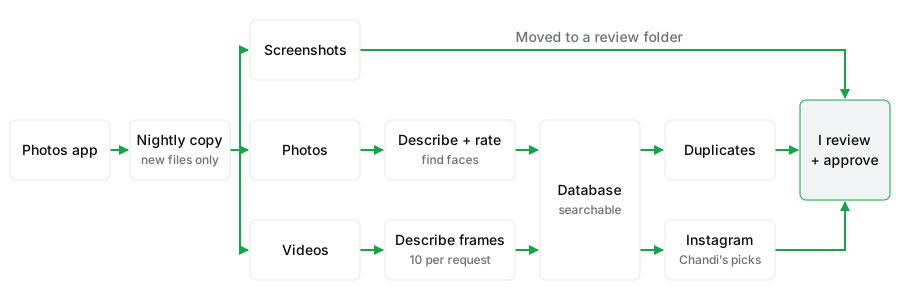
Online AI wrote the code, local AI runs it
Who does which job
How I used AI coding assistants without sharing my photos explains how that works.
What the database knows about each photo
One row per photo or video, with four kinds of information:
- Basic facts: date and time, location when available, file type, and length.
- Quality: sharpness, brightness, contrast, and a rating from bad to great.
- Content: a written description, search tags, and any text in the picture.
- People and pets: faces and pets, linked to names I’ve given it.
The phone saves the basic facts when you take the picture. Everything else comes from local AI models, measurements made by code, and names I typed in.
Pick a model to describe photos
To find a picture without remembering when I took it, every photo needs a written description. A model, the trained part of an AI tool that does the actual work, writes them, and it has to be accurate. One that makes things up is worse than no search at all, because searches start finding things that aren’t there.
My constraint: everything had to run locally on my Mac, so I could only pick from models that were free, ran locally, and actually ran on my machine. I gave four of them the same ten free test photos (not mine), timed each one, and had Claude help me grade the descriptions. One had a group of 12 people on a tennis court; another had a sign hanging upside down.
| Model | Ten photos | What happened |
|---|---|---|
| Gemma 4 26B-A4B | 35 sec | Said 13 people (12 were there); saw the sign was upside down |
| Qwen3.6 35B-A3B | 30 sec | Described things that weren’t there |
| Gemma 4 31B | 95 sec | Said 11; got the sign wrong |
| Qwen3.8 27B | 87 sec | Said 11; lots of detail |
Measured on a MacBook Pro with an M5 Max chip and 128 GB of memory.
I chose Gemma 41 (the 26B-A4B version), a free model from Google: about 3.5 seconds a picture, and the most accurate descriptions in this small test. The test photos and every model’s answers are in Gemma 4 vs Qwen. I run a compressed copy built for Macs2 by the MLX community. The 26B means about 26 billion parameters, the numbers a model learns in training, but size alone didn’t decide it: the bigger Gemma 4 31B was slower and missed more. I skipped models over 100 billion parameters: on my writing and research tests they were much slower on my Mac and did no better.
The Gemma version I ran uses about 27 GB of memory on my Mac, so your computer decides which models you can run. Whatever you have, try a few on ten pictures whose right answers you know, and count mistakes as well as seconds.
Describe a video in pieces
A video is a fast flip-book of still pictures called frames. At 24 frames a second, one minute holds 1,440 frames. At 3.5 seconds each, that minute would take about 84 minutes, and I have thousands of minutes.
So I take one frame per second, each stamped with its time, and the model describes ten at a time. Given thirty or more at once, it started making up a story. One last request joins the notes into a description of the whole video.
On a six-minute video I made with code, so I knew every event in advance, it described all 20 events in the right order in 107 seconds. That doesn’t prove it’s accurate on my family videos, but it showed the job was doable.
Rate quality like a person would
Sharpness is easy to measure, and a sharp photo can still look awful. So along with simple checks for blur and brightness, I compared three AI models that rate photos against ratings from real people. The photos came from KonIQ-10k,3 a public set of about 10,000 everyday photos, each rated by many people. I used only its test photos and sorted each into bad, okay, good, or great by the crowd’s score.
| Model | Ranked like people | Same rating as people |
|---|---|---|
| MUSIQ | 0.947 | 75% |
| LIQE | 0.896 | 65% |
| Q‑ReAlign Mini | 0.811 | 52% |
52 test photos. A ranking score of 1.0 would mean the model put the photos in exactly the order people did.
I chose MUSIQ,4 with one warning: it had already trained on other KonIQ photos, like a student who studied from the same teacher’s old exams. On 100 public phone photos it matched the human rating only 58% of the time, even after I resized them first, usually one step too harsh. But it still put them in roughly the right order, and to pick the best shot of a burst, the order is what counts. Can AI rate photo quality? has the full test.
Name faces: it needs names from me
A model can find a face, but it can’t know whose face it is until I tell it. One model finds the faces, a second turns each into a numeric fingerprint for comparing (YuNet5 and AdaFace,6 for the curious), and a review page groups similar faces so I can name several at once.
I named about 120 people across roughly 1,300 faces. New faces are matched to those, and an uncertain match stays unnamed. Pets didn’t work: their fingerprints were too unreliable.
What broke when I ran the whole library
The first overnight run took about 10.5 hours and finished only about two-thirds of the library. A test of about 1,300 files had gone fine; this one hit a bug that only shows up with lots of files. Fixes to the program that runs the model, and to how failures get recorded, got it through all but 14 files, and every failure now says why. Now only new or changed files get processed, and a night with no new photos never starts the model.
Clean up screenshots and duplicates
The nightly job also moves screenshots into a folder for me to review. In the first sitting I deleted over 90% of about 500.
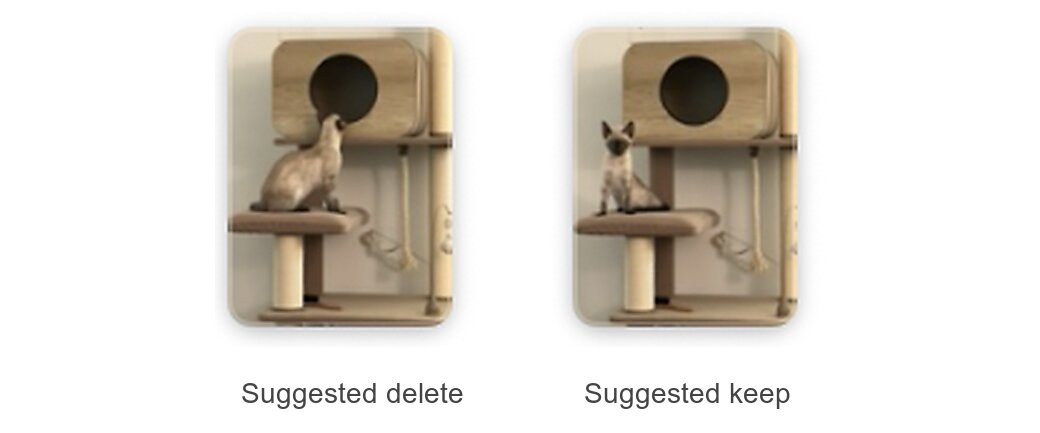
Duplicates are grouped for review too: exact copies by file fingerprint, near copies like bursts by their overall look, each group with a suggested keeper. How I find near-duplicate photos explains the method.
Search my photo library with local AI
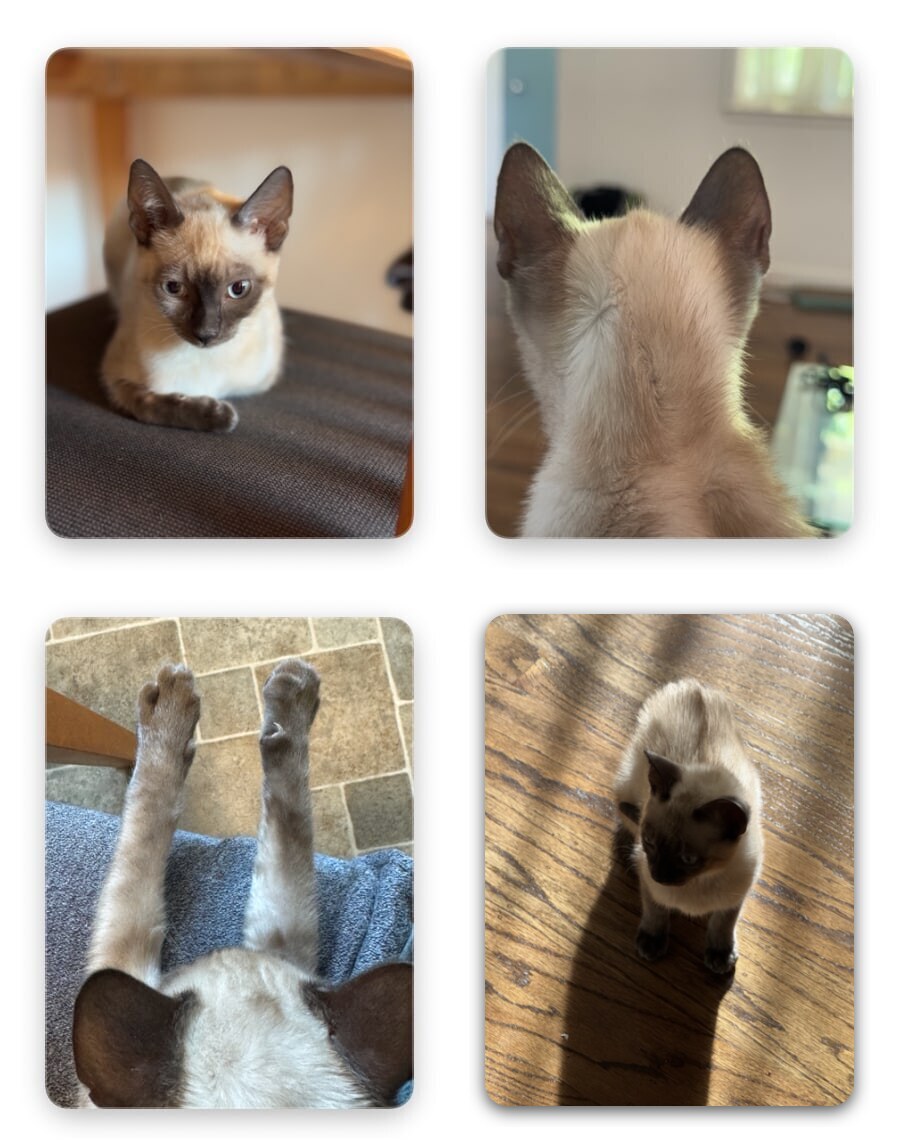
Finding good photos of our cat, Chandi used to mean scrolling through years of pictures. Now one search (good quality, just her, not posted yet) returns over 600 for her Instagram, and I still check each one before it posts.
My photos went from a pile I scrolled through to a library I can search and clean up, without sending any to an AI company. If yours are piling up too, start with one search you’d actually use. corrections: - date: 2026-10-21 text: “The tennis-court test photo shows 12 people, not 13. The models’ answers are unchanged; the table now reads them against the correct count.”