Is X Money’s 6% APY Worth It? How It Compares With SGOV

Summary
- If you get X Money’s 6% without an extra fee, it earns more than SGOV after tax.
- However, X’s default bank-transfer limit is $1,500 a day; my own account’s limits came out far higher, so check yours in the app before you deposit.
- And paying for Premium+ just for 6% only wins above $27,000 to $78,000, depending on your state tax.
I keep eleven months of expenses in SGOV, so when X Money started advertising 6%, I took a closer look. I assumed X’s $8 Premium plan earned that rate.
It doesn’t.
Short answer: the 6% is real, and if you qualify for it without paying extra, take it. It beats SGOV after tax. But check your withdrawal limits in the app first: X’s published defaults are low, and the limits on your own account can be very different.
Here are the specifics: who actually gets 6%, when paying for it pays off, and how to check your limits before you move money in.
What X Money and SGOV are
X Money is the payments account inside X, the social network, and X says it is still rolling out to U.S. residents.1 SGOV is a short-term Treasury bill fund: it holds U.S. Treasury bills that mature within three months. Side by side:
| X Money | SGOV | |
|---|---|---|
| What it is | A prepaid account at Cross River Bank | A fund of short-term Treasury bills |
| Where you hold it | The X app, with an X account | Any brokerage account, like a stock |
| Rate | 4.00% or 6.00%, variable | 4.01%, moves with T-bills |
| State tax on interest | Yes | Mostly not |
| Insurance | FDIC, through the bank2 | None; the price can move slightly |
| Getting money out | Capped; limits vary by account | Sell any market day |
SGOV’s 4.01% averages Treasury bill yields as of October 9, 2026, less its 0.09% expense ratio.
Who gets X Money’s 6% APY?
Two of X Money’s three setups pay 6%, and only one of them costs money:
| Your setup | Rate | What it takes |
|---|---|---|
| Qualifying deposits | 6.00% | $1,000 of paychecks or X Creator payouts in the past 34 days, at no cost |
| Premium+ | 6.00% | An X Premium+ subscription, $40 a month or $395 a year3 |
| Everyone else | 4.00% | Nothing; no subscription needed |
From X Money’s rates page,4 checked October 13, 2026. Rates are variable.
The $8 Premium plan earns 4.00% unless your deposits qualify. Moving your own savings in from another bank doesn’t count, and if the deposits stop, you drop to 4.00%. New York residents earn no interest at all.
If you already get 6% for free, because your paycheck lands there or you pay for Premium+ anyway, it earns more than SGOV after tax at any balance, at today’s rates. Whether that’s worth it depends on how fast you might need the money, which the limits decide.
Does 4% beat SGOV?
It depends on your state tax rate. X Money’s interest is bank interest, which your state taxes. Most of SGOV’s income comes from Treasury bills, which states can’t tax, so the higher your state rate, the bigger SGOV’s edge. In California at a $75,000 income, the 4% rate earns about $94 a year less than SGOV on $30,000. With little or no state income tax, the two come out about even.
You can read more in my comparison of SGOV with high-yield savings accounts.
Is Premium+ worth $40 a month for 6%?
Only on a large balance. The fee is $480 a year paid monthly, or $395 if you pay for the year at once, and it’s the same whether you hold $5,000 or $500,000. The extra interest, meanwhile, grows with your balance. After tax, 6% keeps about 1.088% more of your balance each year than SGOV does, for a single filer earning $75,000 in California. So on the monthly plan, the fee pays for itself at:
$480fee a year÷1.088%extra after tax=$44,100break-even balance
The chart shows the same thing. It counts tax on all of the interest first, then takes out the fee, because you pay for the subscription with money that’s already been taxed.
Paying $395 for the year brings the break-even down to about $36,000. A higher income needs a bigger balance; with no state income tax, a smaller one, about $31,000.
Getting your money out
A high rate only helps if you can reach the money when you need it, and X Money caps how fast it comes out. X publishes default limits, but the limits on your own account can be very different, so the first step is to look at yours.
Open the Limits page in the app and make sure the figures there cover what you would need at once, whether that’s a $10,000 emergency or a down payment. If they don’t, keep that money somewhere you can reach it, whatever X Money pays.
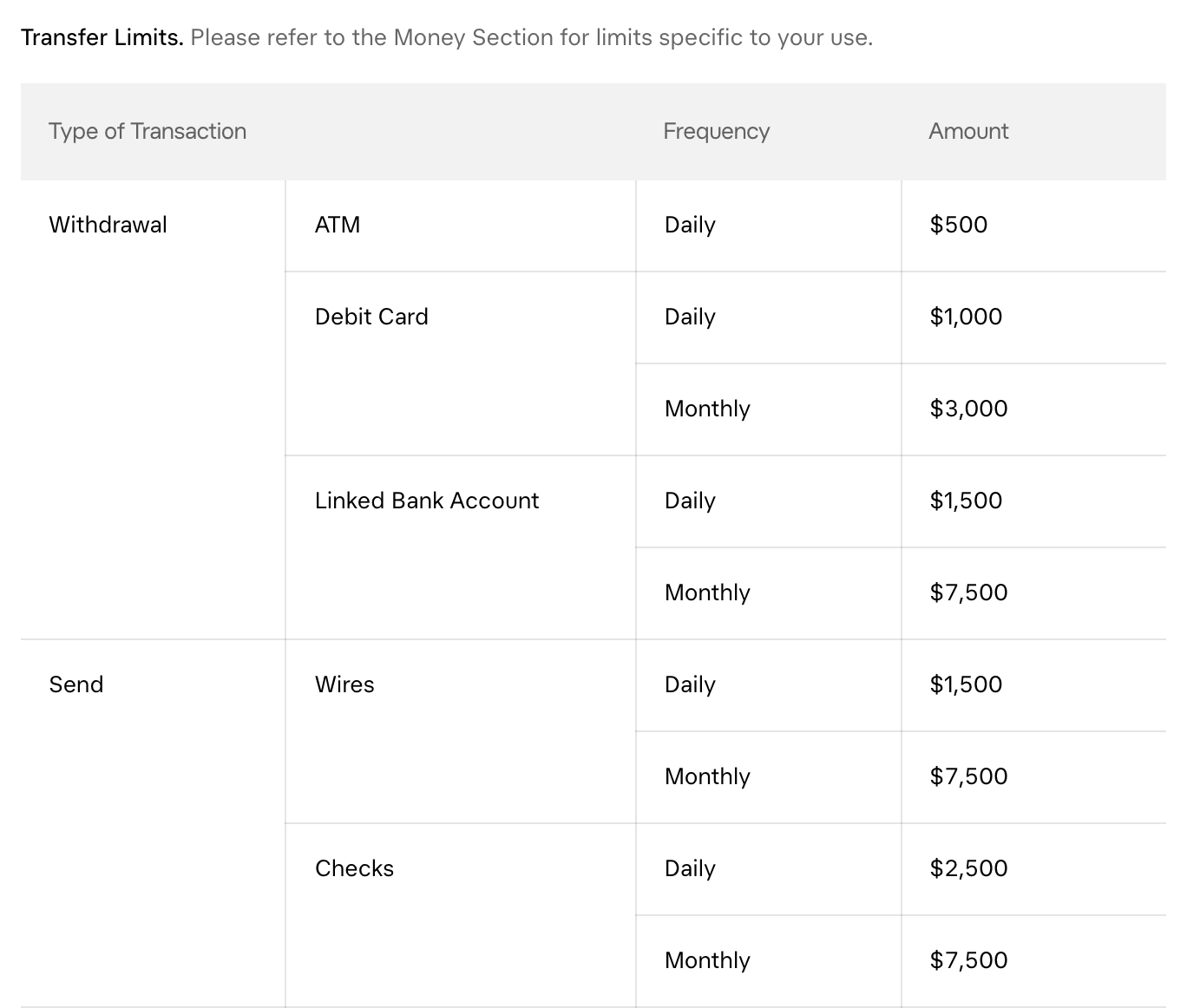
By default, X Money lets you move only $1,500 a day and $7,500 a month to your bank, and wires and checks are capped too. Those figures come from X’s account agreement, which says to check the app for the limits on your own account, and the FAQ says they vary with account activity. At the defaults, a $10,000 emergency is bigger than the monthly limit.
| Way out | Per day | Per month |
|---|---|---|
| Transfer to your bank | $1,500 | $7,500 |
| Wire | $1,500 | $7,500 |
| Check | $2,500 | $7,500 |
| Debit card withdrawal | $1,000 | $3,000 |
| ATM | $500 | Not listed |
By default, from X Money’s account agreement, October 9, 2026. The limits on your own account can differ.
Check your own limits
After I posted the defaults on X, two readers, @ZackStacksKap6 and @CJL5000,7 pointed out that the app shows something different. So I opened an X Money account on October 10 to see for myself, and my limits were nowhere near the defaults. Here is where to find yours:
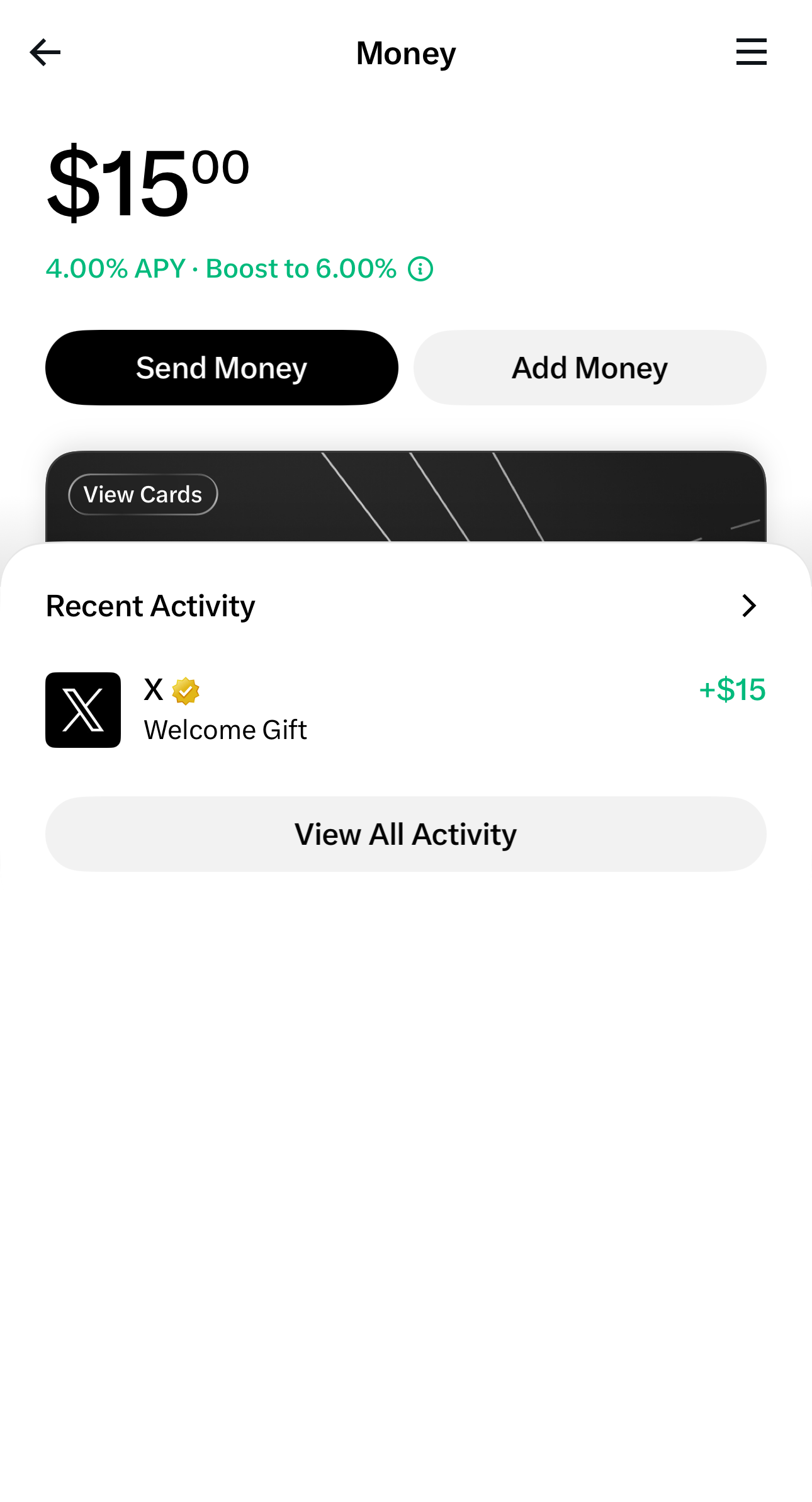
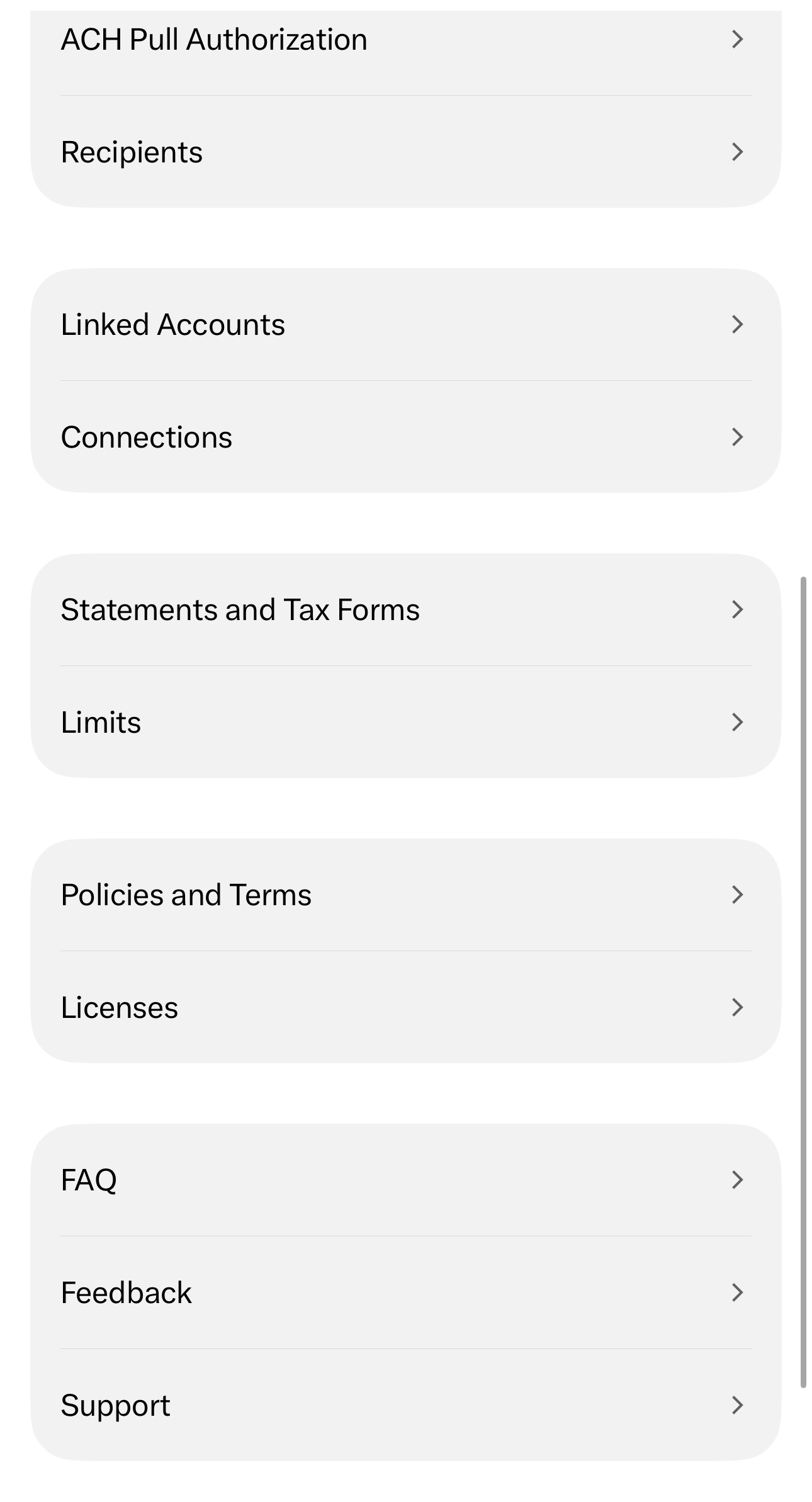
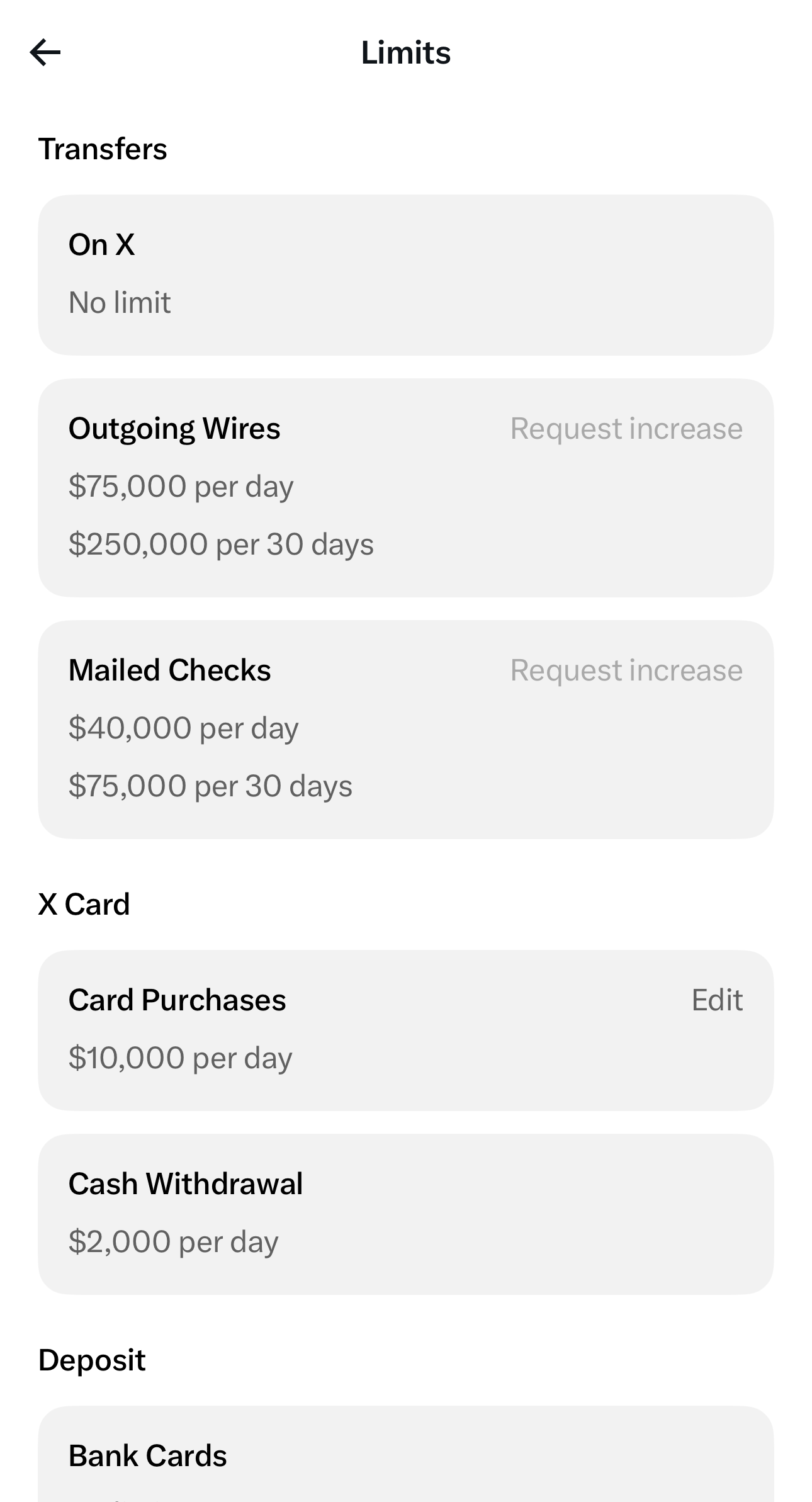
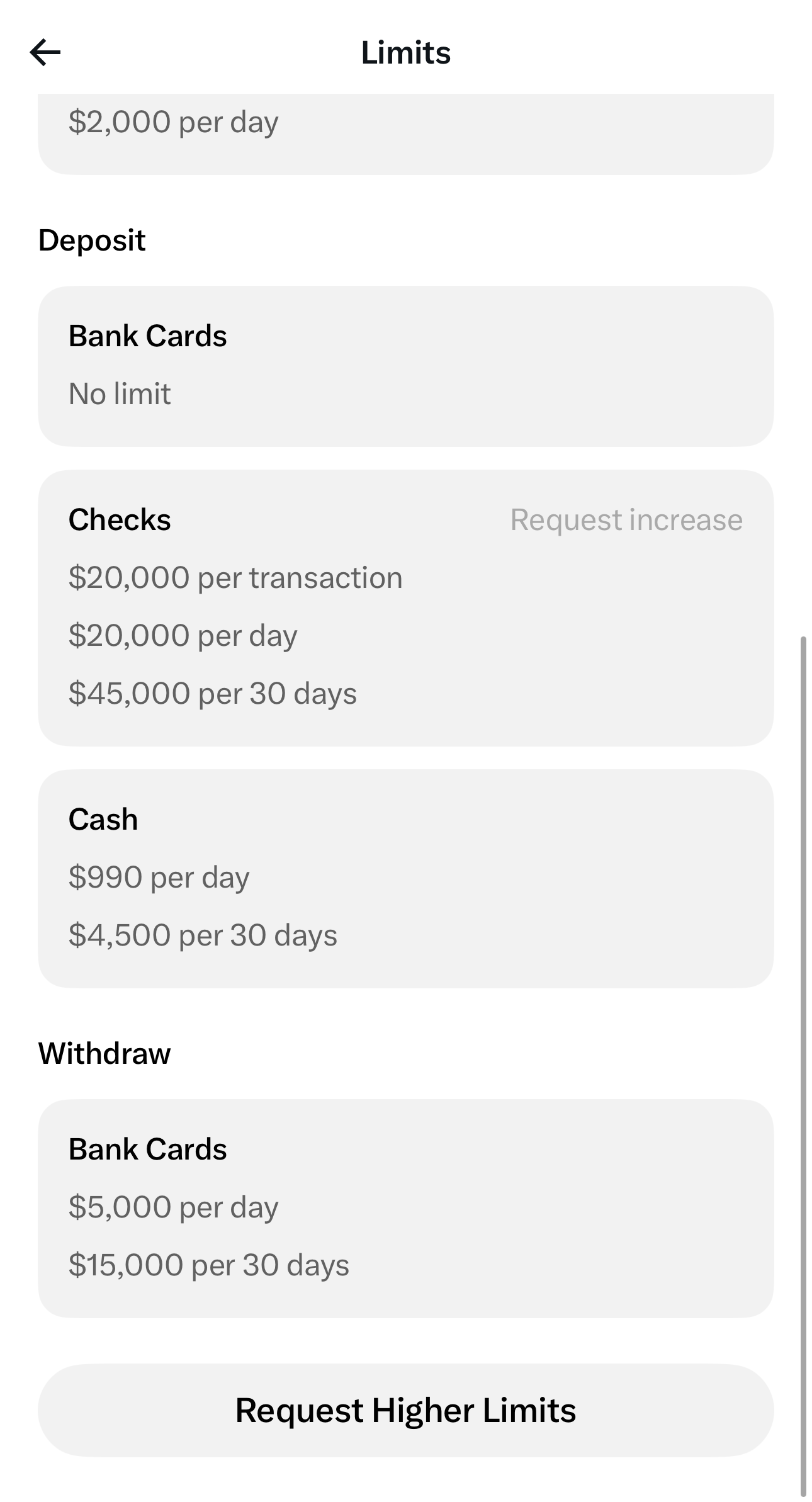
On my account, a wire out is capped at $75,000 a day and $250,000 per 30 days, a mailed check at $40,000 a day, and a withdrawal to a bank card at $5,000 a day and $15,000 per 30 days. The agreement’s defaults for the same three are $1,500, $2,500, and $1,000 a day. The page had no row for a plain transfer to a linked bank account, the one the agreement caps at $1,500 a day, so I can’t say whether that one is higher too. Each capped row has a “Request increase” link, and a “Request Higher Limits” button sits at the bottom.
Your account may show the defaults, my figures, or something else.
The gap matters most for big, planned purchases. Say you’re saving $200,000 for a down payment and park it in X Money for two years. When you find the house, the default limits let you move it out at:
$200,000down payment÷$7,500a month=27 monthsto move it all
Wiring it to escrow or writing a check doesn’t get around this at the defaults: as the table shows, both are capped too. At the wire limit my account shows, the same $200,000 moves in three days. Which limits you have decides the answer, and only the app can tell you.
Speed costs money too. An instant transfer is 1.75%, or $3,500 on $200,000, if your limits allow it at all. Even getting 6% free through qualifying deposits, with no subscription, two years of it earns only about $4,351 more than SGOV after tax, if today’s rates hold, in the same California example. The fee would take most of it.
So the question isn’t whether 6% is a great rate. It’s whether you can get your own money out when you need it.
Be careful about how much you put in, and what it’s for. Match where cash sits to when you’ll need it.
Money that isn’t for emergencies or a purchase in the next few years is usually better invested than parked in any savings account.
SGOV has a delay too. You sell on any market day, the cash settles the next business day, and the transfer to your bank takes one to three more. That’s why I keep next month’s expenses in my bank and the rest in SGOV.
X Money’s terms can change too. The rate is variable. X has paid 6% since July 27, gives no end date, and can change the requirements or stop paying interest. And if X suspends your account under certain policies, the FAQ1 says you lose access to Money and your balance is mailed to you as a check.
How to decide
Start with access. Open the Limits page in the app, and if you might need more at once than it allows, for an emergency or a down payment, keep that money where you can reach it, whatever X Money pays. Then find your situation:
- You already get 6% free. Your paycheck or creator payouts land there, or you pay for Premium+ anyway. X Money earns more than SGOV after tax at today’s rates.
- You’d buy Premium+ for the interest. It pays off only above the break-even for your state and income, about $44,100 in the California example.
- You’d get the 4% rate. About even with SGOV where state tax is low or zero, and behind it where your state taxes interest.
- You live in New York. X Money pays you no interest, so SGOV or a savings account wins.
Check your own numbers
X Money is now one of the options in my SGOV vs HYSA calculator. Pick it, then your state, income, and balance, and see what each option keeps after tax and fees.